
A short link turns a long, hard-to-read address into a short URL that is easy to print on a flyer, read out over the phone or put in a post. With 1li.ch you choose the last part of the link (the alias), so the link tells people straight away what it is about. Every short link has its own statistics, and you can change the destination even after you have shared it.
- Sign in to 1li.ch and open the Dashboard.
- Click the Create link button and choose Shortened URL.
- In the Long URL field, paste the full address of the page you want to share, including https://.
- In the Short URL field, type the alias you want, for example
autumn-menu. If you leave it empty, we create a random alias for you.
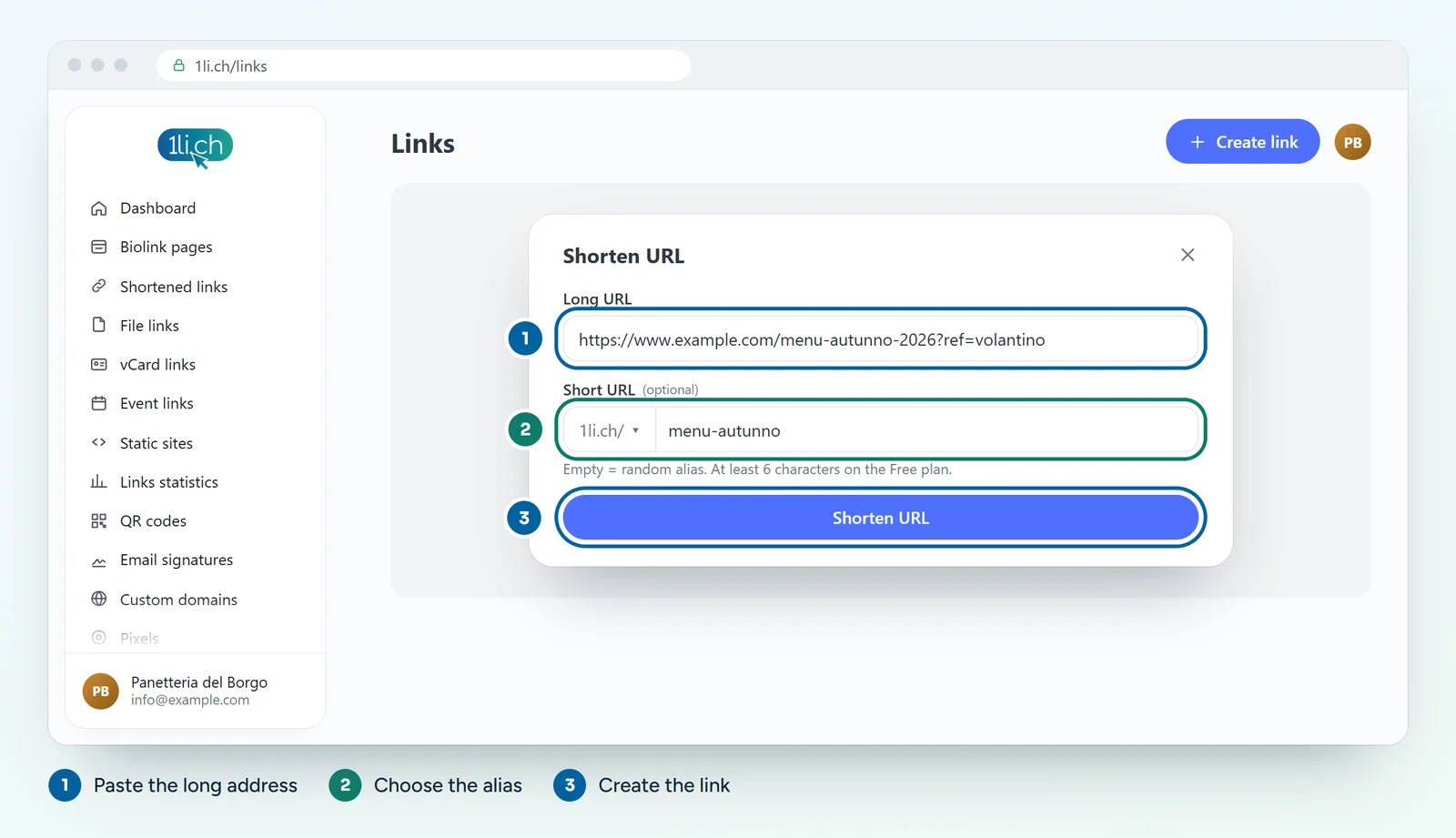
- Click Shorten URL: the link appears straight away in the Links list, ready to copy and share.
Choosing a good alias
You can choose the alias on every plan. On the Free plan it must be at least 6 characters long; from the Personal plan, 3 are enough. A few tips:
- use short, lowercase words separated by a hyphen:
registration-2027is easier to read thanRegistration2027; - avoid letters that are easily confused when spoken or printed, such as lowercase l and uppercase I;
- if the link ends up on a printed QR code, choose the alias carefully and never change it again (see below).
Changing where a link points
Typed the wrong address, or the page has moved? Open the link from the Links list, go to edit it and change the Long URL. Anyone who already has the short link reaches the new destination, and you don’t have to reprint or reshare anything. This works on every plan.
Be careful about changing the alias, though: the old address stops working, and so do any QR codes or flyers that use it.
More options
When you edit the link you will find more settings: scheduling with dates and a click limit, password, UTM parameters, pixels, targeting, splash page, sensitive content warning, blocking search engine indexing, HTTP status code (301, 302, 307 or 308) and the project to group the link in. They are explained in the related guides below.
In your plan
| Feature | Free | Personal | Business | Agency |
|---|---|---|---|---|
| Short links | 1 | 25 | 200 | 1’000 |
| Extra short domains | no | 6 | 6 | 6 |
| Your own domain | no | no | 3 | 25 |
The extra short domains are 1li.bio, 1li.it, 1ly.ch, 1qr.ch, 1love.ch, km0.ch. See plans and pricing.